

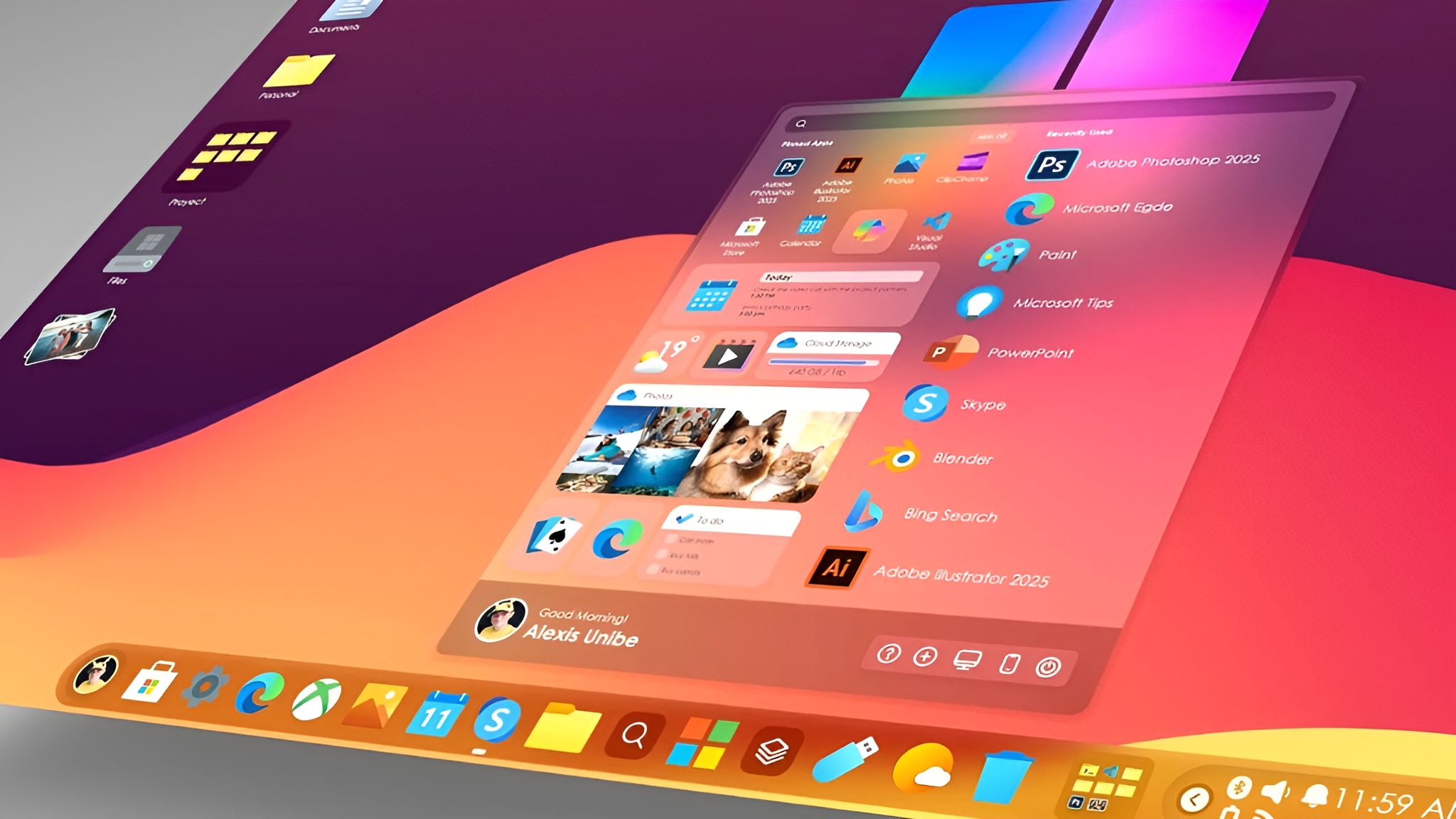
Windows 12 is shaping up to be the next evolution of Microsoft’s operating system, promising a more refined and intuitive experience for users. While Windows 10 and 11 introduced incremental improvements, the need for a truly modern interface is clear. Microsoft faces growing competition from sleek alternatives like macOS, Linux distributions, and ChromeOS, which prioritize efficiency and clean visuals. Windows 12 could redefine desktop productivity with smarter layouts, adaptive themes, and AI-driven tools that learn from user habits. From personalized start menus to dynamic desktops, the new OS may focus on seamless interaction, enhancing both workflow and enjoyment. Users can expect a platform that feels intelligent, responsive, and built for today’s hybrid work environments.
Why a UI Redesign is Needed

Although Windows 10 and 11 brought valuable features, their interfaces often feel cluttered or inconsistent, especially for power users and hybrid device owners. Taskbar limitations, outdated window management, and inconsistent app designs can slow workflows. Competing systems like macOS and ChromeOS demonstrate the appeal of streamlined design paired with productivity-focused features. Modernizing Windows’ interface is essential to keep users engaged, increase efficiency, and attract new audiences. A polished, flexible UI could bridge the gap between casual users and professionals, making multitasking, navigation, and personalization more intuitive. Windows 12 has the potential to balance familiarity with innovation, creating a platform that is as visually appealing as it is practical.
Taskbar Innovations and Flexibility
The taskbar could see major upgrades in Windows 12, including adaptive icons that change based on usage patterns and modular layouts that adjust to screen size. Dynamic widgets might provide live updates, quick actions, and notifications without opening apps. AI-driven suggestions could highlight frequently used programs or recommend shortcuts, streamlining workflows. For hybrid devices, floating taskbars or customizable docking options may offer better touch, pen, and mouse integration. This combination of flexibility and intelligence could make the taskbar a true productivity hub rather than just a launchpad for apps.
Start Menu Reimagined
Windows 12 may introduce a cleaner, fully customizable start menu with AI integration. Apps could be automatically grouped based on usage, and pinned items could dynamically adjust to the user’s workflow. Search functionality might become predictive, suggesting files, apps, or system settings in real time. Speed, simplicity, and personalization would be central, allowing users to quickly access their most important tools without distractions.
Window Management and Multitasking Upgrades
Window snapping and tiling could reach new levels of sophistication in windows 12 iso download. Virtual desktops may be easier to manage with AI-assisted workspace suggestions, predicting optimal layouts for ongoing tasks. Touch, pen, and voice controls could integrate seamlessly with these tools, offering a hybrid approach for tablets, laptops, and desktops. The OS may learn user habits over time, automatically arranging windows and minimizing repetitive adjustments, making multitasking smoother and more intuitive.
Dynamic Personalization Features
Personalization could become central to Windows 12 with adaptive dark/light modes, time-based themes, and AI-driven wallpaper suggestions. Widgets and desktops might become fully modular, allowing users to create layouts suited to work, study, or gaming. AI could suggest color schemes, accent changes, or productivity widgets based on the user’s routine. The result would be a workspace that feels alive, responsive, and uniquely tailored to each user.
Fluent Design and Native App Enhancements
Microsoft’s Fluent Design could evolve further with smoother animations, transparency effects, and consistent depth cues across the OS. Core apps like File Explorer, Settings, and Office could receive visual and functional upgrades, improving speed and usability. Unified design across devices would strengthen the Microsoft ecosystem, ensuring a seamless experience whether on desktop, tablet, or laptop.
AI Integration in Windows 12
AI may become a built-in pillar of Windows 12. Virtual assistants could suggest tasks, automate repetitive workflows, and offer contextual help within apps. Smart notifications could anticipate user needs, flag potential issues, or provide shortcuts for common actions. Beyond convenience, AI integration could enhance accessibility, productivity, and personalization, making the OS not only smarter but also more adaptive to individual user habits.
Gaming and Performance UI Enhancements
Gamers could see a redesigned game mode UI with overlays for performance monitoring and quick access to Xbox and cloud gaming features. AI could suggest settings based on game type or device performance. Streamlined dashboards might provide instant insights into CPU, GPU, and network usage without leaving the game, ensuring smooth gameplay and efficient system monitoring.
Security and Privacy UI Improvements
Windows 12 may revamp security and privacy settings for easier access and understanding. AI could notify users of potential threats in real time and suggest immediate actions. Permissions and update management could be simplified through intuitive interfaces, giving users control without confusion. These enhancements would combine safety, clarity, and convenience in one cohesive UI.
Cross-Device Continuity and Cloud Integration
The OS could seamlessly bridge desktop, tablet, and mobile experiences. Cloud-based themes, app settings, and file syncing may allow users to pick up where they left off across devices. AI-driven syncing could prioritize frequently used apps or layouts, ensuring personalized productivity anytime, anywhere.
Speculative Features: Widgets, Smart Corners, and Gestures
New interactive widgets and live tiles could populate desktops with dynamic content. Smart corners may offer quick actions or multitasking shortcuts. Gesture-based navigation and voice commands, enhanced with AI, might provide hands-free control and context-aware responses. These futuristic tools would push Windows 12 into a more intelligent, adaptable environment.
Conclusion: Envisioning the Future of Windows
Windows 12 promises an interface overhaul that emphasizes productivity, personalization, and AI-driven intelligence. From taskbar innovations to dynamic desktops, users may experience a system that adapts to their habits, boosting efficiency and satisfaction. As anticipation grows, the future of Windows looks smarter, cleaner, and more connected than ever. What interface changes would you hope to see in your ideal Windows 12 setup?