

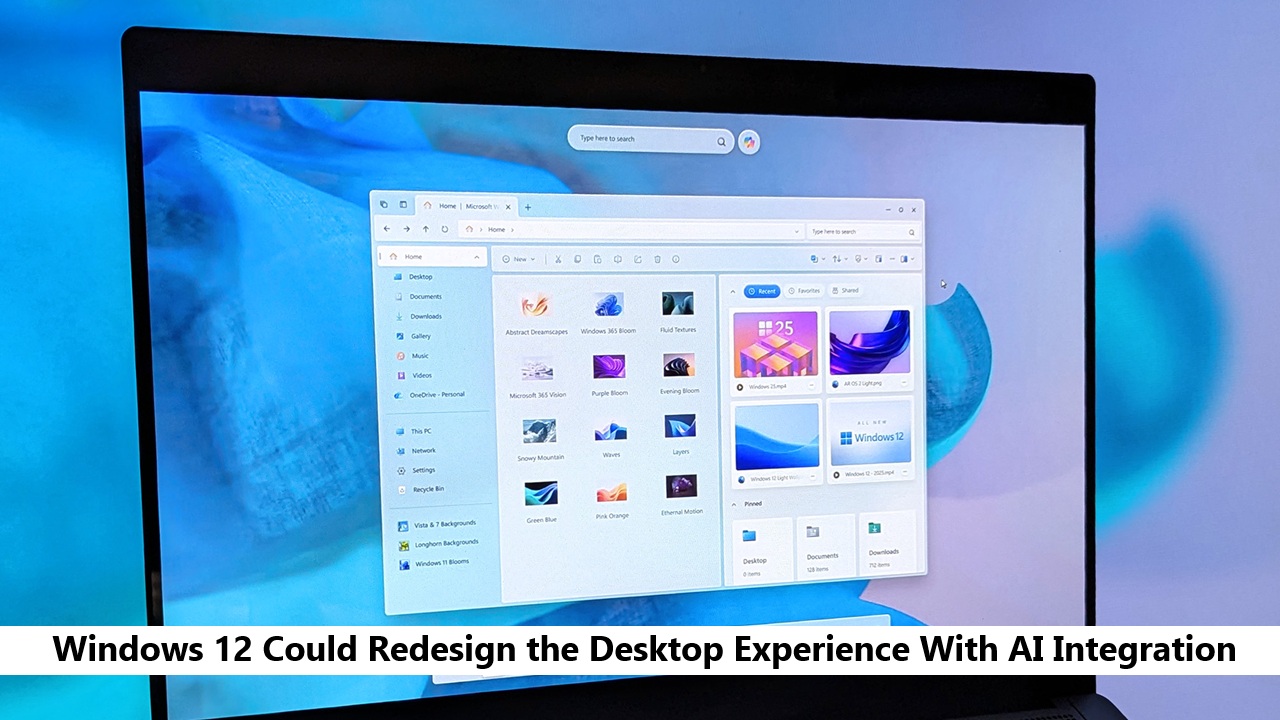
For decades, Windows has followed a familiar formula. A desktop, a taskbar, a Start menu, and a collection of apps working together to help people get things done. But Microsoft is now moving toward something much bigger: an AI first operating system. With the growing influence of artificial intelligence across productivity tools, the upcoming Windows 12 is expected to redefine how users interact with their computers.
Instead of simply launching apps and manually organizing files, the next generation of Windows may actively assist users through intelligent automation and contextual suggestions. Microsoft’s Copilot technology is likely to play a central role in this shift, acting as a built in AI assistant that understands tasks, commands, and workflows.
If these plans become reality, Windows 12 could transform the desktop from a static workspace into a smarter environment that helps users work faster, search smarter, and manage everyday tasks more efficiently.
The Evolution of Windows Desktop From Windows 10 to Windows 12

To understand why Windows 12 could be such a significant shift, it helps to look at how the desktop experience has evolved over the past decade.
Windows 10 focused heavily on the traditional desktop workflow. Users relied on the Start menu, taskbar shortcuts, and manual file organization. While the system was stable and widely adopted, it still followed the same interaction model that had existed for years.
Windows 11 introduced a more modern visual approach. The centered Start menu, redesigned icons, and simplified interface created a cleaner workspace that felt more aligned with modern devices and productivity habits.
Now Microsoft appears to be preparing for a much larger transformation. With artificial intelligence becoming a core part of software development, Windows 12 is expected to integrate AI deeper into the operating system itself. Instead of just redesigning the interface, Microsoft may be redefining how the entire desktop works.
AI Powered Desktop: What It Could Mean for Everyday Users
An AI powered desktop could dramatically change how people interact with their computers during everyday work. Instead of relying entirely on manual organization and search, the system may begin to understand user habits and provide contextual help when it is needed most.
For example, the desktop might suggest files, apps, or documents based on what a user is currently working on. If someone regularly opens certain files together, the system could automatically surface them at the right time. Over time, the operating system could learn patterns and reduce repetitive actions.
File management may also become smarter. Rather than manually sorting folders, users could ask the system to organize documents, group similar files, or locate information through simple natural language queries.
Another major improvement could be predictive system actions. Windows might automatically recommend tasks, reminders, or workflow shortcuts depending on the context of the user’s activity.
Combined with voice commands and conversational input, these AI driven features could make the desktop feel less like a tool and more like a collaborative assistant designed to improve productivity.
Microsoft Copilot as the Core of Windows 12
Microsoft Copilot is already becoming a central feature across the company’s software ecosystem, from Office applications to Windows 11. In Windows 12, however, Copilot could move beyond being a simple sidebar tool and become the core control layer of the operating system.
Instead of navigating through multiple menus or settings pages, users might be able to control many system functions through natural language commands. Tasks such as adjusting system settings, managing applications, or troubleshooting problems could be handled through a conversation with Copilot.
Another important change may involve deeper integration with Microsoft services. Copilot could connect with cloud storage, productivity apps, and enterprise tools to provide a unified workspace experience. For example, it might summarize documents, suggest edits, or help locate information across multiple applications.
If Microsoft fully commits to this vision, Copilot could become the main interface between users and the operating system. The desktop would still exist, but AI assistance would guide many of the actions that previously required manual navigation.
Possible UI Changes in Windows 12 Desktop
Beyond artificial intelligence features, Windows 12 may also introduce noticeable changes to the desktop interface itself. Several industry leaks and reports suggest that Microsoft is experimenting with a more flexible and dynamic layout.
One rumored change involves a floating taskbar that separates system elements such as the Start menu, search, and notifications. This could create a cleaner visual environment while making important controls easier to access.
Widgets may also become more intelligent. Instead of static information panels, AI powered widgets could display contextual data such as calendar reminders, work related documents, or relevant notifications based on current activity.
Another possibility is an adaptive desktop layout. The system could adjust the arrangement of windows, shortcuts, and workspaces depending on the type of task being performed. For example, a productivity focused layout might automatically appear when opening work applications.
Combined with a smarter notification system and customizable workspaces, these design changes could make Windows 12 feel more responsive and personalized than previous versions.
AI Powered File Search and System Management
File search has long been one of the most frustrating parts of desktop computing. Many users struggle to locate documents quickly, especially when large numbers of files are stored across multiple folders.
Windows 12 could significantly improve this experience through AI powered search capabilities. Instead of remembering exact file names or locations, users may be able to describe what they are looking for using natural language.
For example, a search query such as “presentation about marketing from last month” could allow the system to identify relevant files based on context, content, and creation date.
Artificial intelligence may also help organize files automatically. Documents with similar topics or projects could be grouped together without requiring manual sorting.
In addition, smart storage optimization could analyze system usage and recommend ways to free up space or archive older files more efficiently.
Hardware Requirements and the Role of AI PCs
The shift toward an AI driven operating system also explains why Microsoft has started promoting a new category of devices known as AI PCs.
These computers include specialized hardware components called Neural Processing Units, often referred to as NPUs. Unlike traditional processors, NPUs are designed specifically to handle artificial intelligence tasks more efficiently.
With dedicated AI hardware, Windows 12 could perform many intelligent operations directly on the device rather than relying entirely on cloud servers. This approach offers several advantages, including faster performance and improved privacy.
Microsoft’s Copilot Plus PC initiative already highlights this direction, showcasing laptops that can process AI workloads locally.
If Windows 12 fully embraces AI based features, devices equipped with NPUs may deliver the best performance and unlock the full potential of the new operating system.
Privacy and Concerns Around AI Integration
As artificial intelligence becomes more integrated into operating systems, privacy concerns naturally become part of the conversation.
Some users worry that AI features may analyze personal data, usage habits, or file activity too closely. If these systems rely heavily on cloud processing, questions about data security and storage could also arise.
Microsoft has already indicated that many AI features will run locally on supported hardware. Local processing can reduce the need to send sensitive information to external servers.
The company is also expected to maintain strict security standards, including transparency around how AI features access and process user data.
A balanced approach that prioritizes privacy, user control, and clear settings will likely be essential for building trust in AI powered operating systems.
Expected Release Timeline for Windows 12
Microsoft has not officially confirmed a release date for Windows 12, but industry speculation continues to grow. Based on current development patterns and hardware trends, many analysts believe the operating system could appear sometime between 2026 and 2027.
Microsoft has also been moving toward a more flexible update strategy rather than strictly following long gaps between major versions. This allows the company to gradually introduce AI features through Windows updates while preparing for a larger platform shift.
Recent investments in Copilot, AI PCs, and cloud based services suggest that Microsoft is actively building the foundation required for a more intelligent operating system.
If these developments continue, Windows 12 could represent the next major milestone in desktop computing.
What Windows 12 Could Mean for the Future of Desktop Computing
If Windows 12 delivers on its AI driven vision, it could mark a turning point for desktop computing. For years, operating systems have largely functioned as platforms for launching applications and managing files. Artificial intelligence has the potential to change that role entirely.
Future operating systems may actively assist users by organizing tasks, suggesting actions, and automating repetitive work. Instead of navigating through multiple menus, users could interact with their computers through natural language and intelligent recommendations.
This shift could also influence how software is designed. Applications may rely more heavily on AI services provided by the operating system itself.
As automation becomes more common in digital workflows, Windows 12 may represent the beginning of a new era where computers function less like tools and more like intelligent partners in everyday work.
FAQ Section
What is Windows 12 AI integration?
Windows 12 is expected to integrate artificial intelligence deeply into the operating system, enabling features such as smart search, automation, and AI powered desktop assistance.
Will Windows 12 require AI hardware?
While it may run on traditional systems, devices with NPUs or AI focused processors will likely provide better performance for advanced features.
How will Copilot work in Windows 12?
Copilot may become a central assistant within the desktop environment, allowing users to control system settings, manage tasks, and access information through natural language commands.
When could Windows 12 release?
Most industry reports suggest a potential release window between 2026 and 2027.
Will Windows 12 change the desktop interface?
Yes. Early reports suggest design updates such as adaptive layouts, smarter widgets, and improved system navigation.